
Quick Fixes to Postural Problems from Desk Work
Desk-related neck and back pain is one of the most common reasons people look to improve posture at work. It usually results from prolonged sitting and limited movement, not just “bad posture.” There is no perfect sitting position. The goal is to change positions often, move regularly, and reduce strain through a simple ergonomic desk setup.
Quick wins:
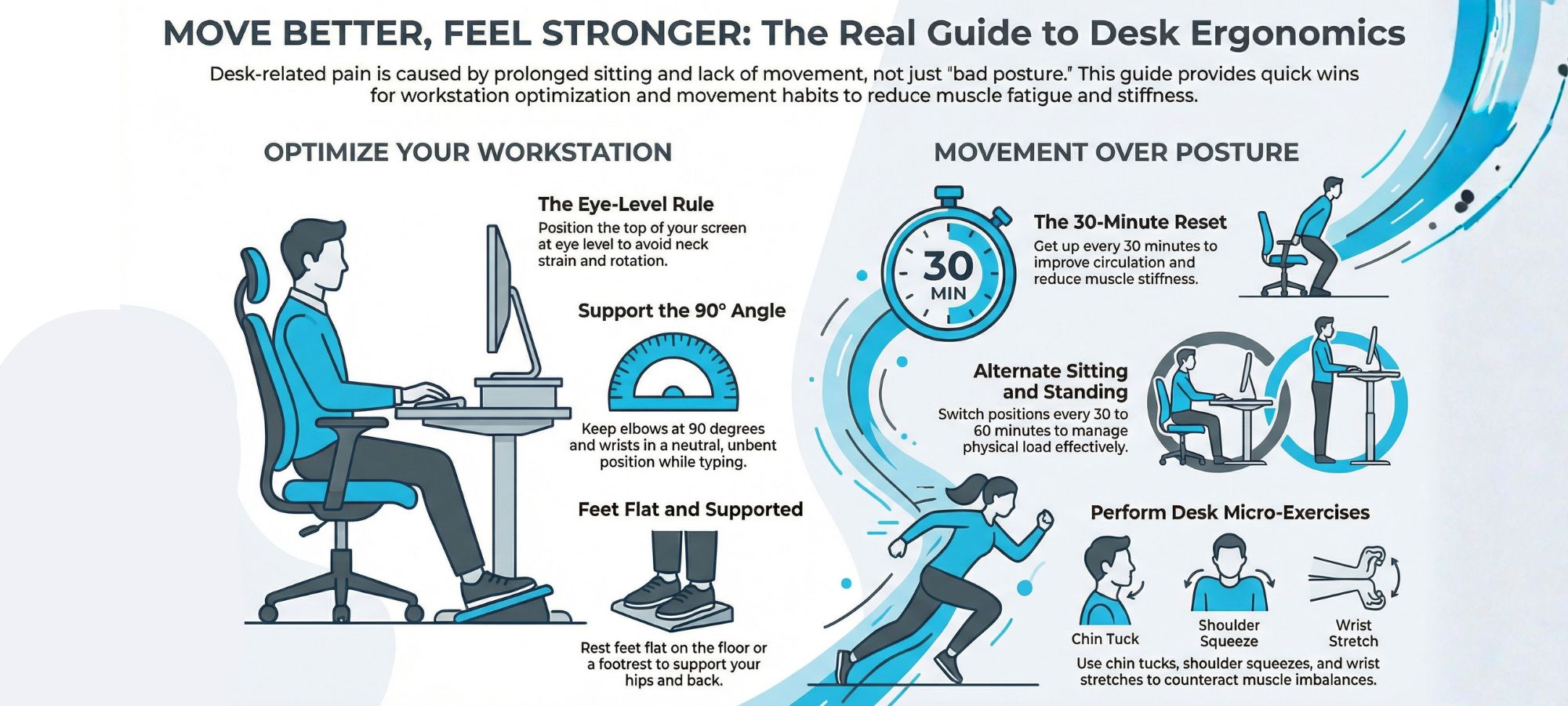
- Keep your screen at eye level and elbows around 90°.
- Make sure feet rest flat on the floor and chair height supports your hips and lower back.
- Alternate sitting and standing if you have a standing desk.
- Get up every 30 minutes, even briefly.
- Add simple desk exercises for your neck, shoulders, back, and wrists.
- Strengthen core and upper back muscles outside of work.
Small, consistent changes beat perfect posture. If pain persists, a physiotherapist can help identify the cause and build a plan to reduce pain and improve how you move at work.
An evidence-based guide to reducing desk-related pain
If you have a desk job, you likely spend hours at a time in a seated position. Prolonged sitting and computer use can contribute to posture issues, neck and back pain, and wrist discomfort. Making small, consistent changes at your workstation can help improve posture and reduce muscle fatigue, tightness, and the risk of chronic pain over time.
The good news is this: posture doesn’t need to be perfect, and small, consistent changes can dramatically reduce pain and discomfort. Below are evidence-based ways to improve your posture and reduce pain from desk work.
1. Understand the Real Cause of Desk-Related Pain
Research consistently shows that pain from desk work is less about a single “bad” sitting position and more about staying in one position for hours. Prolonged sitting reduces blood circulation, increases stiffness, and can overload specific muscle and joint structures in the back and neck muscles.
Common postural patterns seen in desk posture include:
- Forward head position, which increases neck strain and pain in your neck
- Rounded shoulders or hunched bad posture
- Excessive flexion through the lower back
- Wrist extension or compression during keyboard and mouse use
These patterns can lead to neck and shoulder pain, lower back discomfort, wrist pain, and even conditions such as carpal tunnel syndrome.
The goal is not perfect posture. The goal is to manage variability and load.
2. Optimize Your Workstation Setup
While there is no perfect workstation, improving your workstation setup can help you maintain a more neutral spine and reduce strain.
Desk and Chair Height
- Adjust chair height so your feet rest flat on the floor.
- Your knees and hips should be roughly level.
- If needed, use a footrest to keep your feet flat and supported.
- An ergonomic chair can help support the natural curves of your spine, but it is not a magic fix.
Monitor Position
- The top of your screen should be at eye level.
- The monitor should be directly in front of you to avoid neck rotation.
- If you are using a laptop, elevate it and use an external keyboard and mouse to avoid neck and back strain.
Keyboard and Mouse
- Keep your elbow at approximately 90 degrees.
- Wrists should remain in a neutral position, not bent upward.
- Keep the keyboard and mouse close enough so you are not reaching forward.
These small ergonomic adjustments can significantly reduce desk-related pain and help you sit correctly throughout your workday.
3. Sitting Posture: What Actually Matters
- When sitting at a desk, aim for:
- A neutral spine, not rigid but upright
- Shoulder blades are gently supported rather than aggressively pulled back
- Chin slightly tucked rather than jutting forward
- Even weight through both hips
However, even a good sitting posture held for hours at a time can lead to muscle fatigue and stiffness. Poor sitting is often simply sitting too long.
Think of correct posture as a moving target. The best posture is your next posture.
4. Use Sitting and Standing Strategically
A standing desk can be helpful, but switching from sitting to standing without breaks does not automatically reduce neck and back pain. Evidence suggests that alternating between sitting and standing is more effective than staying in either position for hours.
Tips to help:
- Change position every 30 to 60 minutes
- Avoid locking your knees when standing
- Keep the monitor at eye level in both positions
Alternating between sitting and standing helps improve blood circulation and reduce tightness in the back and neck muscles.
5. Build in Regular Movement Breaks
The simplest intervention for desk work pain is movement.
Set a reminder to get up every 30 minutes. Walk to refill your water, perform a few desk exercises, or simply stand and stretch.
Regular movement breaks help:
- Reduce stiffness
- Improve circulation
- Decrease muscle fatigue
- Prevent neck and back pain from building up
Even 60 seconds of movement can help you feel significantly better.
6. Desk Exercises That Actually Work
Quick desk exercises can help counteract the muscle imbalance created by prolonged sitting.
For Neck and Shoulder Relief
- Gently retract your chin to counter forward head posture
- Perform shoulder blade squeezes to activate mid back muscles
- Slow neck rotations to reduce neck strain
For Lower Back
- Stand and extend gently backward
- March in place to activate core muscles
- Perform seated pelvic tilts to reduce stiffness
For Wrist and Hands
- Stretch your hands by extending and flexing the wrist
- Shake out your hands
- Gently stretch forearm muscles
These exercises support the back and neck muscles and reduce pain and discomfort associated with desk posture.
7. Strength Outside of Work
What you do outside of work matters just as much as your desk setup.
Strength training focused on core muscles, glutes, and upper back can help you maintain better posture during your workday. Regular physical activity also reduces the risk of chronic pain.
Staying active improves muscle endurance, blood circulation, and overall resilience to load. This reduces the likelihood that sitting-related stress will cause pain.
8. When to Seek Professional Help
If you experience persistent back or neck pain, neck pain radiating into the arm, or wrist pain that does not improve with ergonomic changes, consult a physiotherapist.
Physiotherapy can:
- Identify the specific cause of your pain
- Address muscle and joint dysfunction
- Provide individualized desk exercises
- Help you improve your posture in a practical way
In some cases, chiropractic care may also provide short-term symptom relief, but long-term improvement typically requires strengthening and movement strategies.
Key Takeaways
Posture right does not mean rigid. It means adaptable.
Pain from desk work is usually the result of prolonged sitting, muscle fatigue, and reduced movement, not simply poor body alignment. A perfect workstation is less important than consistent variability.
To reduce pain:
- Optimize your workstation setup
- Keep your screen at eye level
- Ensure feet rest flat on the floor
- Take regular movement breaks
- Alternate sitting and standing
- Strengthen outside of work
These evidence-based strategies can reduce pain and help you feel more comfortable during your workday.
If desk-related pain is limiting your ability to stay active, a physiotherapist can help you develop a plan tailored to your workspace, work environment, and lifestyle.
You do not need perfect posture. You need sustainable habits to stay mobile, adaptable, and resilient.
Work Smarter. Move Better. Feel Stronger.
If desk-related pain is affecting your focus, sleep, or ability to stay active, the team at South Island Physiotherapy can help. Our physiotherapists take the time to understand your work setup, movement patterns, and daily demands, then develop a personalized plan to reduce pain and improve your body’s tolerance for desk work. From hands-on treatment and targeted exercise programs to practical workstation advice you can actually apply, we can help you move better, feel stronger, and stay productive without chasing “perfect” posture. Book your appointment today!